PhotoCraft 下载与上手:开源 Photoshop 替代品的安装试用
发布 2026-10-12 · 事实核对 2026-10-12
PhotoCraft 是免费开源、用 Rust 编写的图像编辑器,自称早期 alpha。我们在 Mac 上下载了 0.8.2 版:校验和一致,macOS 判定为已公证应用,可直接打开。我们只做了冒烟测试:打开 JPEG、添加曲线调整层、输入文字图层、查看导出格式(PNG、JPG、WebP、TIFF、TGA)。
项目自己的路线图写明「尚不是可用于日常专业工作的 Photoshop 替代品」,自评约 45% 可用;写出的 PSD 尚不能保证被 Photoshop 稳定打开。至于是否 AI 编写:README 没有明说,但仓库带有 AI 代理指南,路线图以「Opus 5.5 代理小时」估算剩余工作量,12 天内约 1,800 次提交。
结论:适合试玩图层、蒙版和文字;不适合接客户修图交付,也不适合与 Photoshop 用户来回交换 PSD。请只从官方渠道下载。
以下为英文全文。
PhotoCraft is a free, open-source image editor that models itself on Photoshop. It is written in Rust, ships for macOS, Windows, Linux and FreeBSD, and is labelled early alpha by its own authors. We downloaded the latest release, version 0.8.2 (published 2026-10-12), on a Mac and used it for a first session. This post covers installing it, what we saw, what the project itself says is missing, and the "AI Photoshop clone" question. Context on the wider family is in the hub post.
Download and install
The official routes are the PhotoCraft page on getartcraft.com and the Releases page. We host nothing. Each release includes a SHA256SUMS.txt; check the file you downloaded against it.
| Platform | File in release 0.8.2 | Tried by us |
|---|---|---|
| macOS (Apple silicon and Intel) | photocraft-0.8.2-macos-universal.dmg, about 88 MB | Yes |
| Windows x64, arm64, x86 | .msi installer or -portable.zip for each | No |
| Linux x86_64, aarch64 | AppImage, Flatpak, deb, rpm or tar.gz | No |
| Linux riscv64, FreeBSD x86_64 | tar.gz (riscv64 also deb and rpm) | No |
| Browser | photocraft-web-0.8.2.zip, a static site you host yourself | No |
| Command line | photocraft-cli-0.8.2-macos-universal.zip | No |
- On macOS, download the DMG and run
shasum -a 256on it. Ours matched the published value. - Open the DMG and drag PhotoCraft to Applications. The app is about 169 MB and contains both arm64 and x86_64 code.
- Open it. Gatekeeper accepted our copy as a notarized Developer ID app, so there was no security override to click through.
- On Windows, the README says installers and executables are code-signed. We did not test Windows or Linux.
First run
The app opens straight into the editor with no account step. We passed it a JPEG on the command line and it opened as a Background layer. The layout will look familiar to Photoshop users: a toolbox down the left, Color, Properties and Layers panels on the right, a workspace switcher labelled Essentials, and a menu bar with File, Edit, Image, Layer, Type, Select, Filter, View, Window and Help. The single-letter tool shortcuts we read from the toolbox tooltips match Photoshop's: V for Move, M for Marquee, L for Lasso, C for Crop, B for Brush, S for Clone Stamp, E for Eraser, T for Type and so on.
The interface language follows the system language. Our Mac is set to Chinese, so the first launch was in Chinese. Launching with an English language flag gave an English interface.
What we did and what worked
Test image: the public-domain NASA Apollo 8 Earthrise photograph, 2400 by 2400 pixels.
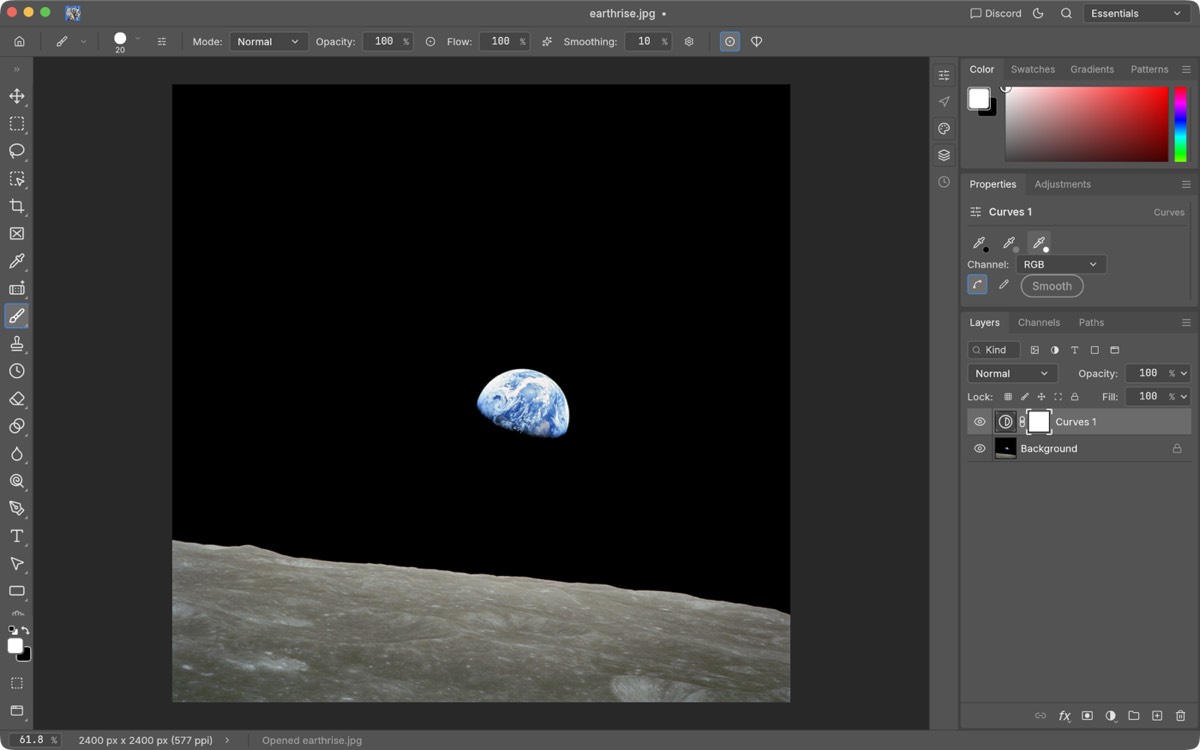
- Adjustment layers. The Adjustments panel offers a grid of adjustment types. Adding Curves created a masked adjustment layer, as in Photoshop. The Properties panel showed the channel selector at our window size; we did not see the curve graph and did not try resizing the panel, so we cannot say whether that is a bug.
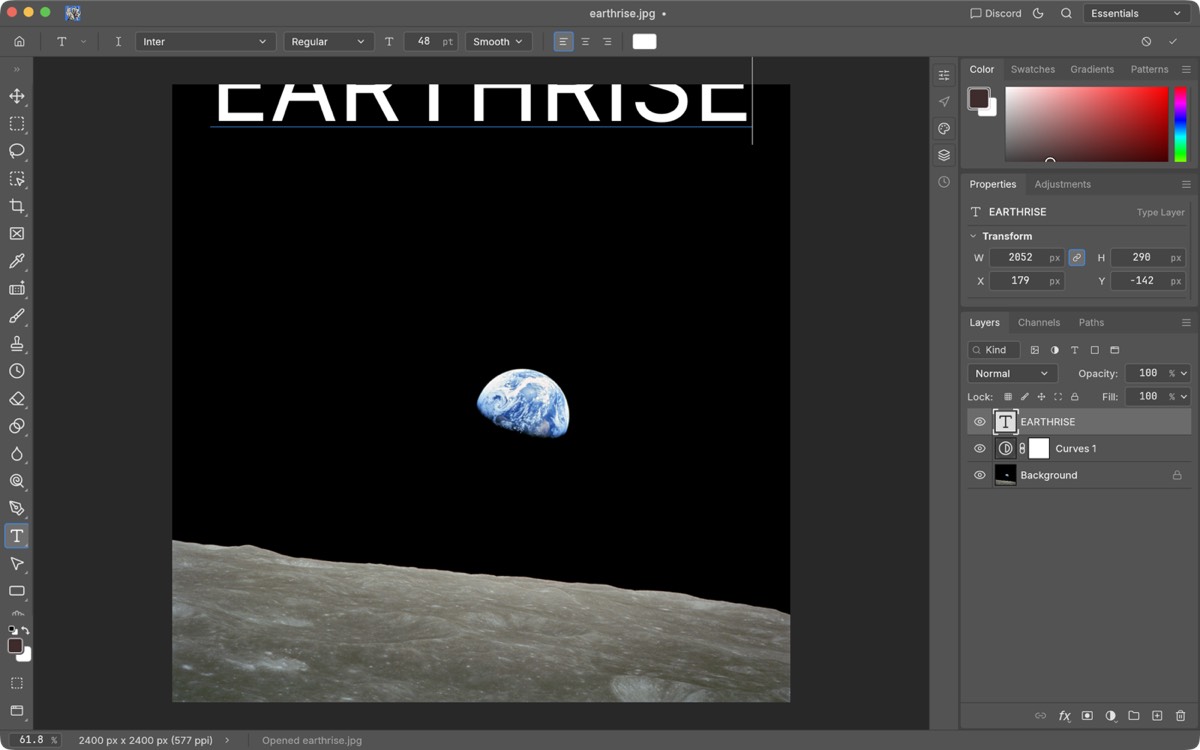
- Type. We typed a headline with the Type tool. It became a live type layer, with Inter at 48 pt as the default. We clicked close to the top edge, so the text sits partly outside the canvas; that was our placement, not a defect.
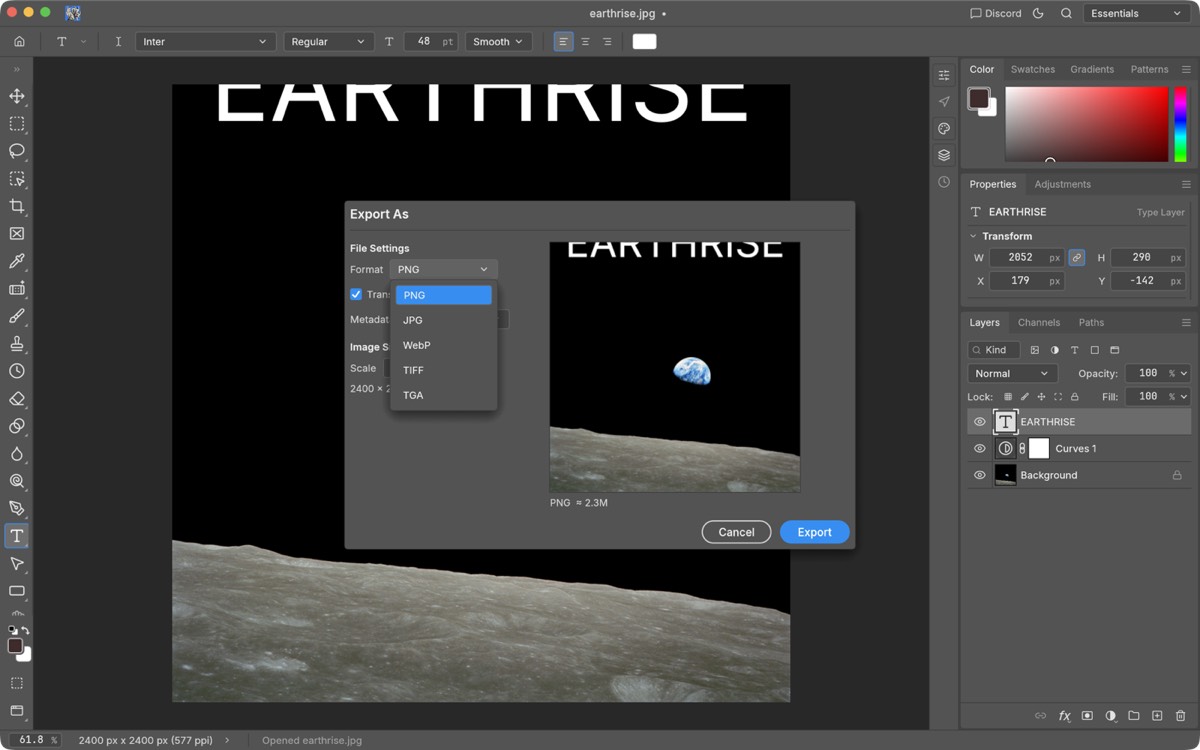
- Export. File, Export, Export As opened a dialog with a live preview and size estimate (about 2.3 MB for the PNG).
We did not test: opening or saving real Photoshop-authored PSD files, brush and retouching tools in anger, colour management, RAW files, tablet input, large documents or performance. Our session was a smoke test on one image, not a review of retouching quality.
What is missing versus Photoshop
We lean on the project's own statement here, because it is blunter than any outside review. Its roadmap, last reviewed on 2026-10-11 against version 0.6.0 and so possibly behind 0.8.2, says PhotoCraft "is not yet a Photoshop replacement for daily professional work" and estimates it about 45% ready for real work. The gaps it lists:
- Tools. 56 of 68 toolbox tools exist, per the roadmap.
- Generative and AI features. Listed as the largest gap. Local smart selection (Quick Selection, Object Selection, Select Subject) exists.
- PSD exchange. PSDs that PhotoCraft writes were not yet reliably accepted by Photoshop at the review, tracked in the issues numbered 1281 and 2469. Reading PSDs is stronger than writing them, and the project reports that re-saving keeps the render of 307 of 309 files in a third-party test set.
- Performance. At the review, 22 of 25 internal performance budgets were missed.
- Type depth, pro workflows and plug-in compatibility. Listed as gaps.
For retouching and export that means: the Clone Stamp and Remove tools are in the toolbox, but we have no evidence of their quality on skin or print work. And for export, the dialog we saw for PNG had no colour-profile or output-sharpening option. If a client needs a layered PSD back, or a print-ready colour profile, use Photoshop for that file.
The "AI Photoshop clone" question
People mean two different things by this phrase.
Does it have AI features? Few. The README says generative features are a gap. What it does have runs locally with no account: smart selection, and an automation layer. Every menu item and tool is one of more than 500 commands that the UI, a command-line tool, a JSON control channel and an MCP server all share, so an external AI agent can drive the same editor you click.
Was it written by AI? No sentence in the README says who wrote the code, so we cannot state it as fact. The circumstantial evidence is strong, though. The repository contains a guide for AI agents and contributors, and its roadmap measures remaining work in "Opus 5.5 agent wall-clock hours", calibrated from 1,004 merged pull requests. The repository was created on 2026-09-30 and has about 1,800 commits twelve days later. That pace points to agent-driven development at scale; how much human review sits behind it is not stated.
What that means for stability: speed of writing is not the risk. The risk is behaviour on real-world files, which no quantity of generated tests fully covers. The project says as much: every Photoshop menu item is wired to a command, but "that measures wiring, not behaviour". It rates its own stability about 45%. We would treat it as a fast-moving alpha, test it with your own files, and keep your originals untouched.
Verdict
Worth installing if you want to try layers, masks and type in a free editor, or you follow the project. Not yet a tool to hand a client retouching job to, and not a safe round-trip partner for people on Photoshop. Check back after a few releases; the project is shipping new versions daily.
CutHub is a cloud workbench for video post-production; the editing workspace is where we cut our own client work.
来源
上文事实均于所示日期从以下页面读取;无法核实的内容已在正文中标明为未测试或未说明。 (2026-10-12)
- storytold/photocraft README — Early alpha label, platforms, signed builds, 500+ commands, local smart selection, trademark and independence notice
- storytold/photocraft ROADMAP.md — ~45% ready, 56 of 68 tools, 22 of 25 performance budgets missed, PSD exchange gap; last reviewed 2026-10-11 at version 0.6.0; 1,004 merged PRs; agent-hour estimates
- storytold/photocraft AGENTS.md — Guide for AI agents and contributors
- PhotoCraft release v0.8.2 — Published 2026-10-12; asset list; SHA256SUMS.txt
- PhotoCraft on getartcraft.com — Official download page