FilmCraft on GitHub: a Premiere alternative, tried by a studio
Published 2026-10-12 · Facts checked 2026-10-12
FilmCraft is a free, open-source non-linear video editor that models itself on Adobe Premiere Pro. It is written in Rust, comes from the same ArtCraft team as the other Craft apps, and its own label is alpha. We cut video for clients, so this is the Craft app closest to our work. We installed version 0.7.2 (published 2026-10-12), imported three codecs, built a timeline and exported two formats. Background on the family is in the hub post.
Short answer
Today FilmCraft can be a second seat for simple cuts on a Mac, where the sources are H.264, HEVC or ProRes and the delivery is H.264. It should not be the only path to a delivered client file. The project agrees with the second half: its roadmap rates it about 56% ready for real work.
Where the project says it stands
- Stage and numbers. Alpha. Its roadmap, last reviewed on 2026-10-10 against Premiere Pro 26.5.2, gives feature breadth of about 86% and ready-for-real-work of about 56%, and counts 45 crates, about 343,000 lines of Rust, 268 merged pull requests and 69 authors.
- Biggest gaps, in its own words. Speed on big footage; Premiere project files (.prproj) cannot be opened; no plug-in hosting; limited software delivery codecs; camera and phone files from the wild are less tested; Windows and Linux get far less testing than macOS; few AI features.
- Repository. Dual MIT or Apache-2.0, 599 open issues and pull requests combined at the time we checked.
Timeline, codecs, colour and export
| Area | What the README claims | What we saw |
|---|---|---|
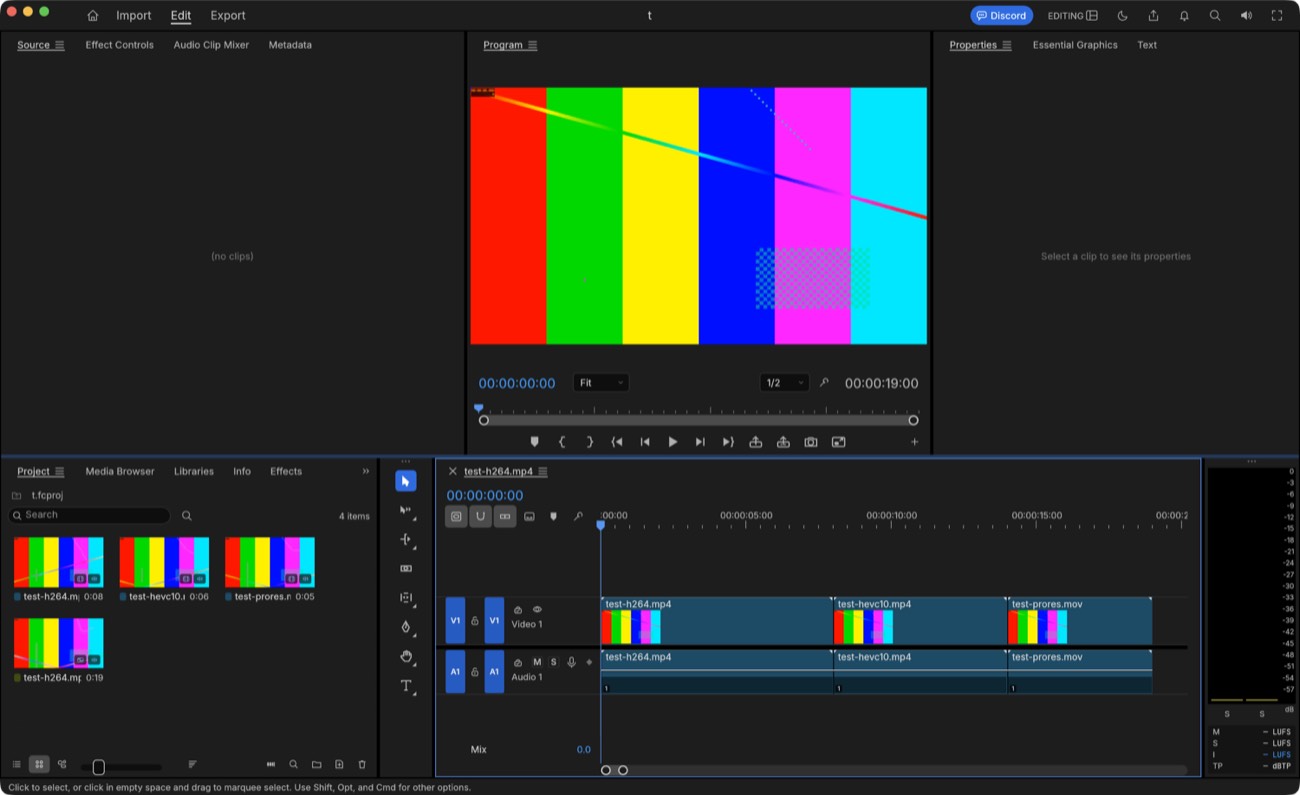
| Timeline | Source and Program monitors, bins, multi-track timeline, three-point editing, ripple, roll, slip, slide and razor, Editing, Assembly, Color, Effects and Audio workspaces, Premiere, Final Cut and Avid key presets. | Edit workspace with monitors, bins and a V1/A1 timeline, Premiere-style. We did not try the trim tools. |
| Codecs in | H.264, HEVC Main and Main 10, ProRes 422 Proxy to 4444 XQ, DNxHD and DNxHR, VP9, AV1, MPEG-2, MXF. Own decoders written in Rust, no FFmpeg inside. Not yet: camera RAW, E-AC-3. | H.264 1080p, HEVC Main 10 (10-bit 4:2:0) and ProRes 422 HQ all imported with thumbnails and correct durations. |
| Colour | A Lumetri-style panel: basic correction, curves, colour wheels, HSL secondary, vignette, eight built-in looks (written in code, not LUT files), plus scopes. | Not tested. We found no mention of LUT import in the README's grading section. |
| Export | H.264 MP4 with AAC from its own encoder, ProRes 422 HQ, DNxHR, MJPEG, MXF, PNG sequences, GIF, WAV. H.265 export only through a hardware encoder. No AV1 export. | H.264 and ProRes HQ exported and verified (below). The Export page showed one destination, Media File, plus a queue. |
| Interchange | FCP7 XML, FCPXML 1.9 to 1.11, OpenTimelineIO, CMX 3600 EDL, AAF, OMF. | Not tested. |
Our test
We generated three clips with ffmpeg so that no client material was involved: a 1080p30 H.264 clip (8 s), a 1080p30 HEVC Main 10 clip (6 s) and a 1080p30 ProRes 422 HQ clip (5 s), each with a tone. We imported them, placed them back to back into a 19-second sequence, and exported with the FilmCraft command-line tool and checked the files with ffprobe and ffmpeg. The machine was an Apple M2 Max with 64 GB of memory running macOS 26.3.1.
| Export | Render time | Result checked with ffprobe and ffmpeg |
|---|---|---|
| H.264 MP4, command-line default | 19.6 s for 19 s of video | High profile, 1920x1080, yuv420p, tagged bt709, AAC-LC 48 kHz stereo, 48 MB. ffmpeg decoded it with strict error detection and no errors. |
| ProRes 422 HQ MOV | 10.9 s | ProRes HQ, yuv422p10le, PCM audio, 258 MB. ffprobe reported its colour space as unknown. |
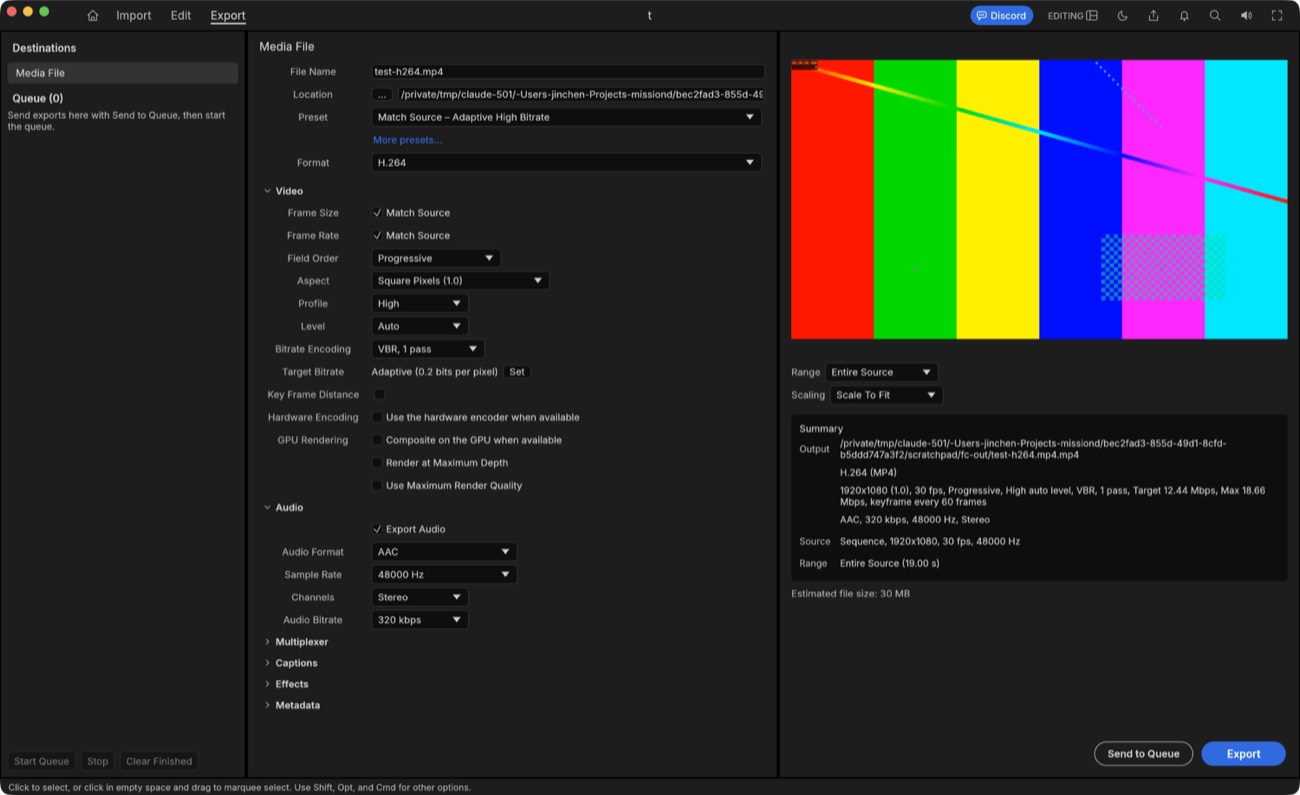
Two things worth noting. First, the app's own Export page defaulted to a 12.4 Mbps adaptive preset with an estimated 30 MB for the same sequence, while the command-line default produced 48 MB, so defaults differ between the two front ends. Second, we killed the app process while a project had unsaved changes. On the next launch it offered to recover them, which is the behaviour a studio wants. The README describes an auto-save and crash-journal system; we saw only the recovery prompt.
Can a studio cut a client video in it today?
For a short, simple job with ordinary footage on a Mac, yes, as long as someone checks the output on the delivery device and the original editor is still available. For a normal client week, not yet. A post house depends on things the project lists as missing: opening an editor's project, running a plug-in, delivering HEVC from software, and grading from a client's LUT. The usual risk with a young editor is not the feature list but footage the developers never saw.
What we would need before using it
- Our real footage. A week of ingest from the cameras and phones we actually receive: long-GOP 10-bit HEVC, 4K, variable frame rate. The project says real-world media is less tested than conformance streams.
- Delivery. Software H.264 is the only delivery codec the README lists; ProRes and DNxHR exports are intermediates. HEVC export needs a hardware encoder: VideoToolbox on macOS (8-bit SDR) or NVIDIA on Windows. There is no AV1 export.
- Round trips. Timelines move through FCPXML, FCP7 XML, AAF, EDL or OpenTimelineIO, since .prproj files do not open. We would test a real timeline both ways with Final Cut Pro, Resolve and Premiere before trusting it.
- Speed on 4K. Lumetri-style grading, keys and export rendering run on the CPU. GPU compositing and hardware encoding were unchecked boxes by default in our build.
- Plug-ins and LUTs. No OpenFX, VST3 or Audio Units hosting, and no documented LUT import.
- Colour tagging. ffprobe reported our ProRes export's colour space as unknown. We would check tagging against a reference on every delivery format.
- Windows and Linux. The project says these get far less testing than macOS; we tested only macOS.
Install notes
Get it from the FilmCraft page on getartcraft.com or the Releases page; we host nothing. On macOS the file is filmcraft-0.7.2-macos-universal.dmg (about 73 MB, app about 147 MB, arm64 and x86_64). Its SHA-256 matched the release's SHA256SUMS, and Gatekeeper accepted it as a notarized Developer ID app. Windows (MSI and portable zip), Linux (AppImage, Flatpak, deb, rpm, tarball), FreeBSD and a web build are also listed; we did not test them. The app takes project or media files as arguments, and --empty or --demo start a blank or demo project. The interface language follows the system language.
CutHub is a cloud workbench for video post-production; the editing workspace is where we cut our own client work.
Sources
Each fact above was read from these pages on the date shown. Anything we could not verify is marked as untested or unstated in the text. (2026-10-12)
- storytold/filmcraft README — Feature claims, codec table, export and interchange lists, status and gaps, platforms, key presets
- storytold/filmcraft ROADMAP.md — Alpha, 86% breadth, 56% ready, 45 crates, 268 merged PRs, 69 authors; last reviewed 2026-10-10
- FilmCraft release v0.7.2 — Published 2026-10-12; asset list; SHA256SUMS.txt; CLI zip
- FilmCraft on getartcraft.com — Official download page
- Our own test — Builds installed and run by CutHub on 2026-10-12; synthetic ffmpeg test clips, filmcraft-cli 0.7.2 exports, ffprobe and ffmpeg checks